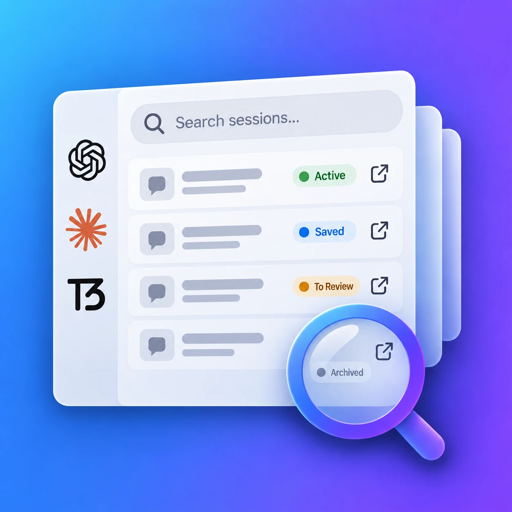
Session Board gathers the Claude Code, Codex, Claude Cowork, Cursor and T3 Code sessions stored on your Mac into one fully indexed list. Find any conversation in seconds, keep track of what is still open, and jump back in where you left off.
This is a live demo. Search, pick a project, change a status, double-click a session.
The problem
“I fixed this exact bug last week… was that in Codex or in Claude Code? Which project?”
Each assistant stores its sessions in its own format, in its own folder, behind its own search — when it has one.
The answer you need is somewhere in the middle of a conversation, not in its title.
Dozens of sessions a week, some finished, some half-done, some waiting on you. Nothing tells them apart.


How it works
No setup, no plugins, no account. Session Board reads the histories your tools already keep on your Mac.
~/.claude/projects
~/.codex/sessions
Cursor/UserEvery session found on your Mac, grouped by the git repository it ran in. It keeps watching the history folders and re-reads only the files that changed.
One field searches titles first, then the full text of every conversation, with the matching words highlighted in context.

Read the whole session without leaving the board, or double-click to reopen it in the app that created it and keep going.
Stay on top of it
Give each session a status and notes, like issues in a tracker. Settle what's done; Session Board brings it back the moment you use it again in its tool.
Found by the first index, not sorted yet.
What you are working on. New sessions start here.
Parked for later, waiting on something.
Done for now. Back to Active by itself if it gets new messages.
Out of the way, still searchable and still reopenable.
Features
A native Mac app, fast on libraries of thousands of sessions.
Every Codex, Claude Code, Claude Cowork, Cursor and T3 Code session found on your Mac, with the title it has in its own app.
Sessions grouped by git repository, worktrees included. Rename projects, reorder them, file them into folders.
Titles first, then every word of every conversation, by prefix, ignoring case and accents. Excerpts show each match in context.
Read any session as a conversation without opening its app. A gutter of prompts lets you skim long sessions and jump to any turn.
Active, Snoozed, Settled or Archived, plus free notes on each session. Set the status of many sessions at once.
Double-click to continue a session in the app that created it, even one that is archived there.
The library follows the history folders and rescans by itself. A settled session that gets new messages turns Active again.
When a tool deletes a transcript, its last indexed copy stays readable on the board.
Inspect tool calls, tool replies and injected system tags like <system-reminder> that the original apps keep out of view.
Supported tools
Session Board knows where each tool keeps its history. Install it, grant read access once, and the board fills itself.

CLI, desktop app and SDK sessions.
~/.claude/projects
Codex CLI and desktop, archived sessions included.
~/.codex/sessions
Sessions that run on this Mac.
~/Library/Application Support/Claude
Chats and agents.
~/Library/Application Support/Cursor
Threads run through T3 Code.
~/.t3/userdataConversations that never touch your Mac, like claude.ai, ChatGPT or Cowork cloud sessions, can't be indexed.
Your sessions hold your code, your ideas and sometimes your secrets. Session Board reads them where they are and keeps everything it builds from them on your Mac.
Histories are never modified. Session Board only asks macOS for read access to your home folder.
The search index, your statuses and your notes live in the app's sandbox container on this Mac.
Only anonymous usage and performance figures, to make the app faster. No personal data, no conversation content.
Coming soon to the Mac App Store.
FAQ
No. It only reads the history files your tools write. Statuses, notes and project names are kept in Session Board's own database, never in the original files.
Your conversations, notes and search index never leave your Mac. The app sends anonymous usage and performance data to help us make it faster, with no personal data and no conversation content. Details are in the privacy policy.
Session Board is sandboxed, and each tool keeps its history in a different place under your home folder. macOS asks you once for read-only access; the permission is remembered across launches.
Yes. Claude Code and Codex sessions open directly in their desktop app, archived ones included. For Cursor and T3 Code, which have no link to a single session, Session Board opens the app and copies the session title so you can paste it into its search.
Claude Code (CLI, desktop and SDK), Claude Cowork sessions that run on your Mac, Codex (CLI, desktop and through T3 Code), Cursor chats and agents, and T3 Code. Chats on claude.ai or ChatGPT are not stored on your Mac and can't be indexed.
Session Board keeps the last copy it indexed, so the session stays readable and searchable, marked "Original removed".
Use the support form. Tell us your Session Board and macOS versions, which tool the session comes from, and what happened.
The first index reads everything once; after that only new or changed transcripts are read again. Title matches appear instantly and full-text matches follow, and search keeps working during a scan.